The goal of the Definition of Ready (DoR) is to make refinement and development more efficient (read more about the refinement process here). Any developer should be able to pick up any “Ready” ticket and know exactly what's expected of them. Below is an overview of key terms and examples to help create high-quality tickets:
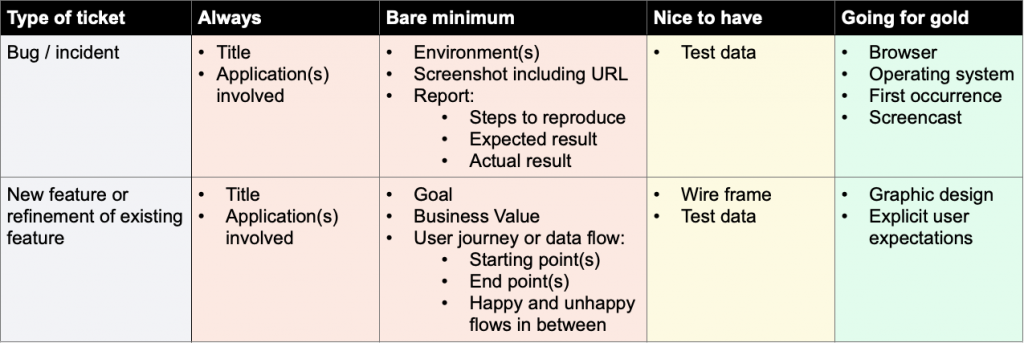
Read the image as text
Bug / incident
- Always
- Title; application(s) involved.
- Bare minimum
- Environment(s); screenshot including URL; report with steps to reproduce, expected result and actual result.
- Nice to have
- Test data.
- Going for gold
- Browser; operating system; first occurrence; screencast.
New feature or refinement of existing feature
- Always
- Title; application(s) involved.
- Bare minimum
- Goal; business value; user journey or data flow, including starting point(s), end point(s), and happy and unhappy flows in between.
- Nice to have
- Wire frame; test data.
- Going for gold
- Graphic design; explicit user expectations.
Why High-Quality User Stories Matter
High-quality user stories ensure that the development team has all the necessary information to work efficiently. Clear and detailed tickets reduce misunderstandings, speed up the development process, and lead to better end products.
Pro Tips for Product Owners
- Use Automatic Formatting Features: Atlassian offers automatic formatting features that simplify the process of creating detailed tickets. These features ensure consistency and clarity, making it easier for everyone involved.
- Leverage AI Chatbots: Utilize AI chatbots to derive concise and relevant information, easing the writing process and enhancing the quality of the stories.
Key Elements of High-Quality User Stories
Here are the key elements to consider when creating user stories. These terms, along with examples, provide the essential information needed by the development team:
Applications Involved
Clearly specify which B2B application is being used. This is especially important when dealing with micro-services.
Browser
Some front-end bugs occur only in certain operating system/browser combinations. Examples include Firefox, Chrome, Internet Explorer 11, and Edge.
Data Flow
Refer to the User Journey or Data Flow section below for more details.
Deadline
If the task has a known deadline, include it in the first part of the
title. The “due date” field in the ticket itself might not be visible on
the board or backlog. Always use the YYYY-MM-DD format. Example:
[TITLE | 2021-01-31]
Environment(s)
Specify the environment(s) involved, such as Test (TST), Staging (STG), Acceptance (ACC), Production (PRO).
Epic
Assigning tickets to the correct epic helps maintain an overview. If uncertain, ask the Product Owner or a Developer.
Explicit User Expectations
Include requirements like “the flow should support at least 2500 products,” “the page should load within 1 second,” or “the page is allowed to ignore product changes beyond the latest 1000.”
First Occurrence
If known, note the first occurrence or first reported incident. This helps in identifying potential causes, such as new deployments or service downtimes.
Flows and Screens Involved
Be specific. Include screenshots or URLs. Not every developer knows every flow in every application.
Goal of the Ticket
Use the “user story” format: “As a <type of user>, I want <some goal> so that <some reason>.”
Graphic Design
A graphic design can make a story more concrete, providing exact measurements and colors. However, remember that they are static and may not account for responsive behavior variations.
Logs
Include any relevant logs as attachments or links to dashboards. Ensure dashboard links include an absolute time range, as relative time ranges can be misleading.
Operating System
Some front-end bugs occur only in certain OS/browser combinations. Examples include MacOS, Windows 10, and Android.
Report
Include:
- Steps to Reproduce: A short recipe on how to reproduce the issue.
- Expected Result: What is the expected behavior/state?
- Actual Result: What is the actual behavior/state occurring?
Screencast
A short screencast can be highly valuable, showing the flow, steps, and results. Include only relevant steps.
Screenshot Including URL
A screenshot can be worth 1000 words. Capture the entire browser window, including the URL.
Test Data
Provide example input or specific files used to trigger behavior. Note that data varies across environments.
Title
For ease of reference, state the application and environment in brackets at the beginning of the title. If known, specify BE (back-end), FE (front-end), or BE+FE.
User Journey or Data Flow
Think of the feature in terms of flow. Use flowcharts or sequence diagrams for clarity.
- Starting Point(s): Specify the start of the user interaction or data, such as a screen, part of a screen, or specific interaction.
- End Point(s): Define where and when the user interaction or data ends, and the desired end state.
- Happy and Unhappy Flows: Consider both ideal and non-ideal scenarios. Define what should happen, what messages to display, and how to handle slow or unresponsive services to minimize user impact.
Version
Specify the precise version of the application involved, if relevant.
Wireframes / Mockups
Combine flowcharts with wireframes for an overview with concrete designs. They are useful for discussing responsive behavior.
Conclusion
Crafting high-quality user stories is essential for the success of your development team. By providing clear, detailed, and comprehensive tickets, you enable your developers to work more efficiently and effectively. Implementing these practices not only enhances the quality of your product but also fosters a more productive and collaborative team environment.